
PSG-FSD
[CVPR 2026] [Dual-Prototype-Guided Multi-task Learning for Unsupervised Anomaly Detection and Classification](https://openaccess.thecvf.com/content/CVPR2026/papers/Luo_Dual-Prototype-Guided_Multi-task_Learning_for_Unsupervised_Anomaly_Detection_and_Classification_CVPR_2026_paper.pdf)
Introduction
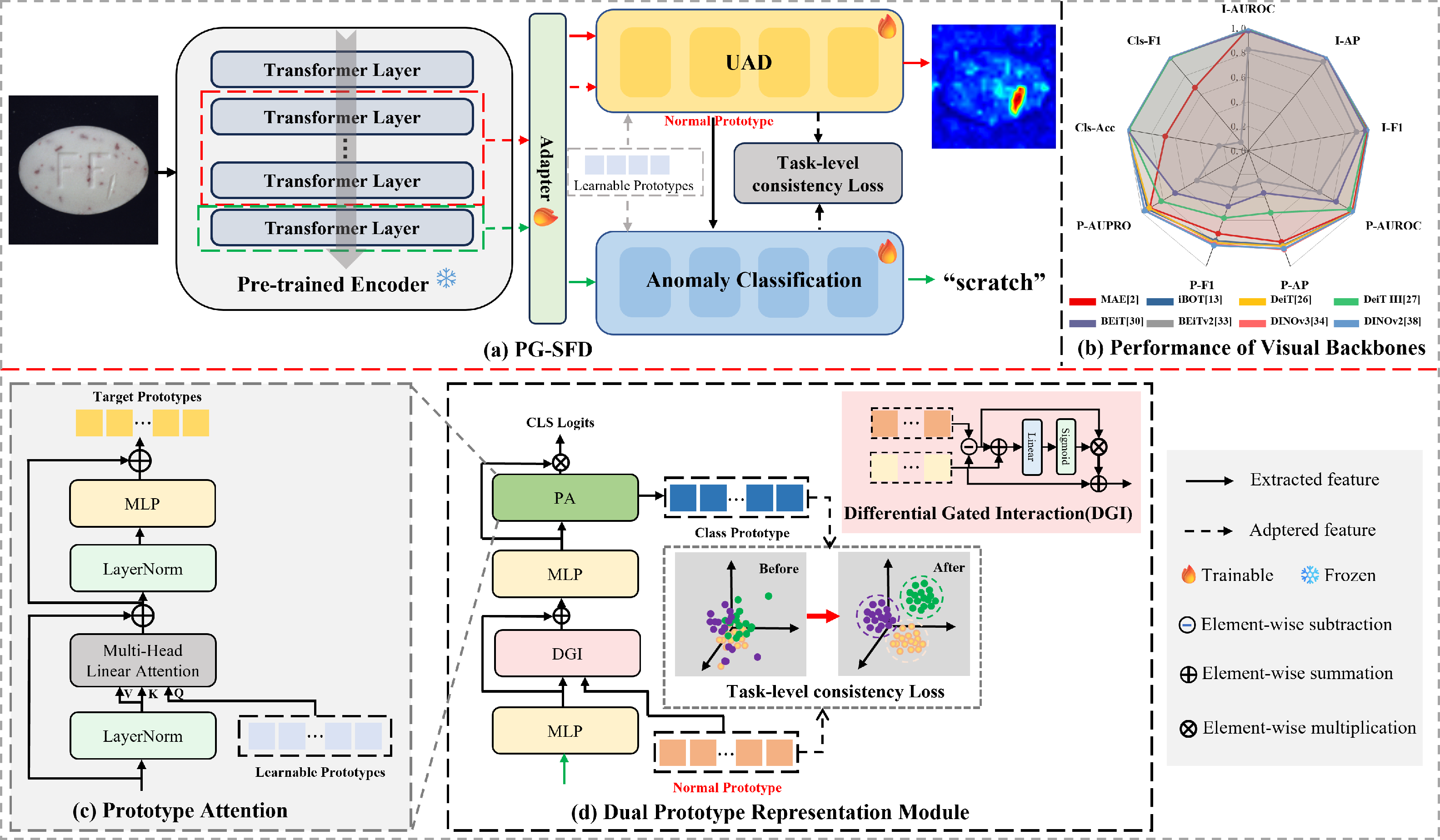
The PG-SFD framework is used to address feature conflicts in the joint task of anomaly detection and classification. Equipped with three key components, namely DPRM for constructing explicit prototypes and mitigating semantic entanglement, DGI for cross-task feature coordination, and GRO for enforcing geometric feature disentanglement, PG-SFD supports end-to-end joint inference for both pixel-level anomaly localization and image-level classification.
Overview of PG-FSD
Installation
Prerequisites
Linux (the code has been tested on Ubuntu)
Python 3.10
An NVIDIA GPU and a CUDA 11.8-compatible driver
The currently validated environment uses Python 3.10.20, PyTorch 2.0.0,
torchvision 0.15.1, and CUDA 11.8. A GPU is required for formal training and
evaluation because the AUPRO implementation in adeval runs on CUDA.
xFormers is optional; the native PyTorch attention fallback can be selected by
setting XFORMERS_DISABLED=1.
Create the environment
git clone https://github.com/luoqianhao/PG-SFD.git
cd PG-SFD

conda create -n pgsfd python=3.10 -y
conda activate pgsfd

pip install torch==2.0.0+cu118 torchvision==0.15.1+cu118 \
  --index-url https://download.pytorch.org/whl/cu118

pip install \
  timm==0.9.12 \
  kornia==0.7.3 \
  adeval==1.1.0 \
  "numpy>=1.26,<2" \
  scipy \
  scikit-learn \
  scikit-image \
  opencv-python-headless \
  Pillow \
  matplotlib \
  pandas \
  tabulate \
  tqdm
Verify that PyTorch can access the GPU:
The expected output includes 2.0.0+cu118 and True.
Create the environment
git clone https://github.com/luoqianhao/PG-SFD.git
cd PG-SFD

conda create -n pgsfd python=3.10 -y
conda activate pgsfd

pip install torch==2.0.0+cu118 torchvision==0.15.1+cu118 \
  --index-url https://download.pytorch.org/whl/cu118

pip install \
  timm==0.9.12 \
  kornia==0.7.3 \
  adeval==1.1.0 \
  "numpy>=1.26,<2" \
  scipy \
  scikit-learn \
  scikit-image \
  opencv-python-headless \
  Pillow \
  matplotlib \
  pandas \
  tabulate \
  tqdm
Verify that PyTorch can access the GPU:
The expected output includes 2.0.0+cu118 and True.
How to Run
Prepare your dataset
Download the dataset below:
MVTec-AD directory layout and anomaly split
The official MVTec-AD training set contains only normal images. PG-SFD also
uses a small number of labelled anomalous images to train its anomaly
classification branch. Following the protocol described in the paper, split
the anomalous images of each defect type into training and testing subsets
at a ratio of 2:8 (approximately 20% for training and 80% for testing).
The released data loader does not create this split automatically. The
dataset must be reorganized before training as follows:
MVTec-AD/
└── carpet/                         # one MVTec-AD object category
    ├── train/
    │   ├── good/                   # original normal training images
    │   ├── color/                  # 20% of color anomaly images
    │   ├── cut/                    # 20% of cut anomaly images
    │   ├── hole/
    │   ├── metal_contamination/
    │   └── thread/
    ├── test/
    │   ├── good/                   # original normal test images
    │   ├── color/                  # remaining 80% of color anomaly images
    │   ├── cut/                    # remaining 80% of cut anomaly images
    │   ├── hole/
    │   ├── metal_contamination/
    │   └── thread/
    └── ground_truth/
        ├── color/
        │   ├── 000_mask.png
        │   └── ...
        ├── cut/
        ├── hole/
        ├── metal_contamination/
        └── thread/
Apply the same layout independently to all MVTec-AD object categories. Observe
the following rules when creating the split:
Keep the official
train/goodandtest/goodpartitions unchanged.Perform the 20%/80% split separately for every defect type; do not pool
different defect types before splitting.Move the selected anomalous images from
test/totrain/. Do not leave the same image in both subsets, because
that would cause train/test leakage.Training anomaly masks are not consumed by the current training loader.
ground_truth/must contain at least the masks for the anomaly
images remaining in the test subset. Keeping the unused original masks is
also supported.A test image such as
test/color/000.pngmust correspond toground_truth/color/000_mask.png. The loader removes the_masksuffix
when pairing test images with pixel-level ground truth.
The --data_path argument must point to the directory containing all object
category folders, for example --data_path /path/to/MVTec-AD.
Quick start PSG-FSD
python train_main_dinomaly_sep.py \
  --phase train \
  --dataset MVTec-AD \
  --data_path MVTec-AD \
  --batch_size 16 \
  --INP_num 6 \
  --lambda-sep 0.2 \
  --lambda-cons 0.1 \
  --separation-tau 1.0 \
  --device cuda:0 \
  --items carpet  \
  --save_dir ./saved_results \
  --save_name infer_001

评论